Glam AI: Video & Photo Editor
- 4.5
- Rating
- 5.00M
- Installs
- Free
- Price

 Analysis by App-foxy
I came away from Glam AI: Video & Photo Editor feeling that it is most useful when I treat it as a fast portrait-creation tool rather than a complete replacement for a traditional photo editor. Its appeal is immediate: I can start with an ordinary selfie and explore a more polished headshot, a stylized avatar, or a subtly adjusted body shape without opening several separate apps. That convenience gives it a clear place in a mobile photography workflow.
At the same time, the app is not equally convincing for every kind of editing. The more I asked for a natural-looking result, the more important my original photo became. Good lighting, a clear face, and a sensible pose gave me much better material to work with than a dark or heavily angled snapshot. My overall view is positive, but with a condition: Glam AI works best as a creative shortcut, not as a guarantee of professional realism.
What the app does well in everyday portrait editing
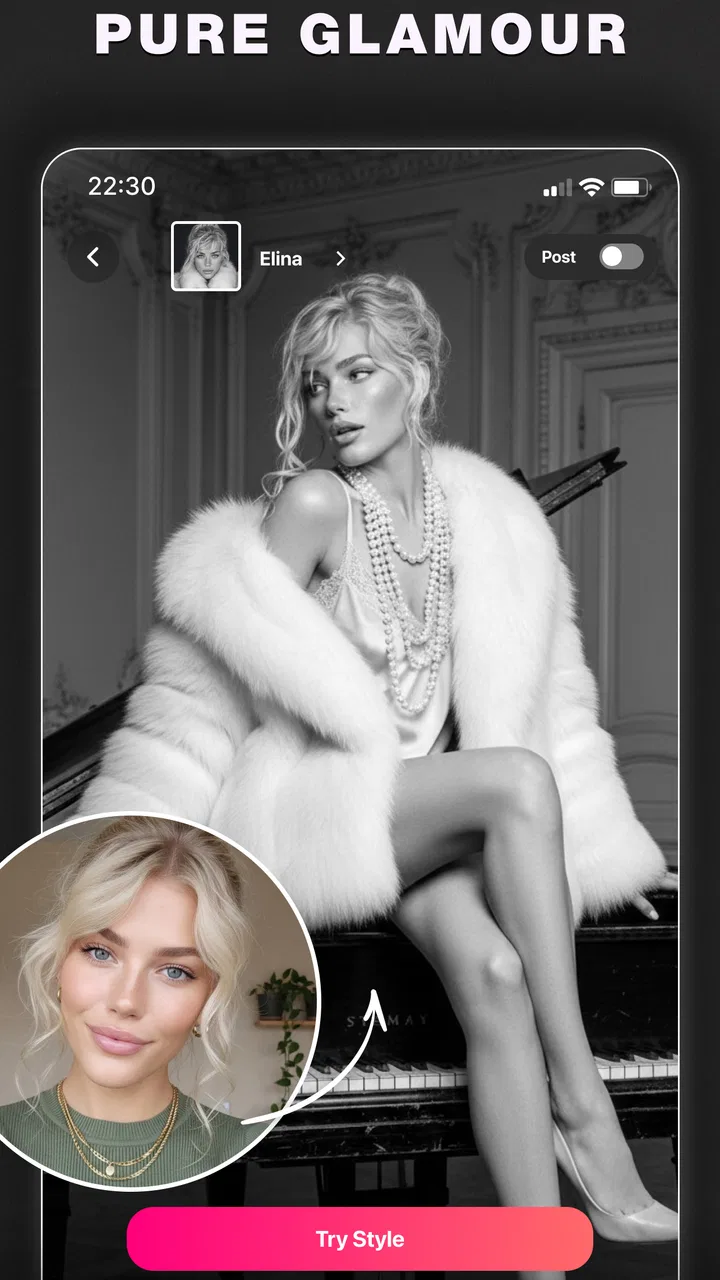
Glam Labs, Inc. has positioned this as a photography app built around AI-assisted portrait transformations. The central experience is approachable because I do not need to understand layers, masks, curves, or manual retouching before trying it. The app focuses on recognizable outcomes: a headshot suitable for a profile, an anime-inspired version of a face, a cartoon avatar, body-shape adjustments, and image enhancement.
You May Also Like

 Blood Strike: 2.5 Anniversary
Blood Strike’s Loadouts Turn Every Drop Into a Tactical Gamble
A close look at Blood Strike’s custom loadouts: how fast access to signature weapons reshapes its battle royale rhythm, rewards preparation, and narrows the gap between fights.

 Pandora - Music & Podcasts
Pandora’s Music Is Easy to Start, but Harder to Recover
Pandora’s strength is its low-effort path from a seed to a station. Its weak spot is how much confidence it asks you to place in connection, setup, and quiet recovery.

 8 Ball Pool
 Is Built on Rivalries, Rematches, and Routine
A close look at the rivalries, rematches, shared routines, and unanswered safety questions that turn a quick pool match into a persistent mobile community.

 Samsung Music
’s Quiet Strength Is Playing What You Already Own
Its reach comes less from spectacle than from dependable access to a personal library. That simplicity is both the app’s strongest retention engine and its ceiling.

 AccuWeather: Weather Radar
AccuWeather Review: A Quick, Clear Forecast for Everyday Decisions
For everyday plans, the best forecast is the one you can understand quickly. AccuWeather makes rain timing, radar, and local conditions easy to act on, with a few trade-offs.

 Hill Climb Racing
Why Hill Climb Racing Still Turns Crashes Into One More Run
A tiny car, a bumpy hill and one more upgrade: Hill Climb Racing keeps resurfacing because its simple chaos makes every near-miss feel personal.
More From Our News Desk



That focus makes the first session fairly easy to understand. I can begin with a photo from the phone or take one specifically for the edit, then choose the kind of result I want. The difference from a conventional editor is not simply that the controls are faster. The app changes the starting point of the process. Instead of asking me to decide how to retouch every feature, it lets me judge a collection of generated or assisted looks and keep the direction that feels closest to my purpose.
I found that especially useful for profile images. A normal selfie can look too casual for a work profile, too flat for a social account, or simply inconsistent with older photos. A headshot workflow gives me a way to test a more composed appearance without arranging a photo session. The result still depends on the source image, but the app reduces the amount of manual work between “I need a better portrait” and “I have several options to consider.”
The headshot tools are also more practical when I use them for a specific destination. For example, I would choose a clean, front-facing image when preparing a professional profile, while a more expressive photo makes more sense for a personal account. I would not expect the same generated style to suit both contexts. The useful habit is to decide where the image will appear before editing, because a dramatic transformation can be entertaining but less credible in a place where people expect to recognize me immediately.
Creative avatars without a complicated drawing workflow
The anime and cartoon avatar side is where the app feels less like a utility and more like a playground. I can take a familiar face and push it toward a recognizable illustrated identity without drawing anything by hand. This is valuable for users who want a profile picture with personality but do not have illustration skills or the time to commission one.
There is a trade-off here that is easy to overlook. A stylized avatar does not need to preserve every small facial detail to be successful. In fact, an overly faithful result can look less like a deliberate character and more like a filtered photograph. I prefer to judge these outputs by whether they communicate the mood I wanted, rather than by whether every feature remains perfectly realistic.
For group projects, casual communities, and social profiles, that flexibility can be more useful than a polished studio headshot. I can create a visual identity that feels separate from my everyday photo. However, anyone who needs a consistent character across many images may find a dedicated illustration or avatar service more suitable. Glam AI is convenient for creating individual results, but convenience is not the same as full character-design control.
Body editing requires restraint and a clear purpose
The body-shape tools are potentially useful, but they are also where I think users should slow down. A small adjustment can help correct an awkward camera angle or make clothing sit more naturally in a photo. A large adjustment can quickly create visual clues that the image has been manipulated, especially around straight walls, door frames, furniture, or other lines near the body.
My practical approach is to inspect the entire frame after making a change, not just the person being edited. If the subject looks improved but the background bends or stretches, the edit has not really succeeded. I also recommend keeping the original image and comparing it at normal viewing size. Zooming in can make tiny imperfections seem important, while viewing the image as it will actually appear often reveals whether the change is subtle enough.
This is one of the app’s meaningful limitations: automated body editing can save time, but it does not replace careful visual judgment. Users looking for accurate clothing fitting, detailed pose correction, or professional retouching will probably want a more controlled editor. Glam AI is better for quick personal adjustments than for work where every contour must be exact.
Enhancement is most useful when the original photo is almost good
The enhancement tools make sense when a picture is close to usable but needs a cleaner presentation. I would reach for them after selecting a photo with a clear subject, rather than expecting enhancement to rescue a severely blurred, poorly exposed, or badly framed image. AI can improve the impression of a picture, but it cannot reliably reconstruct every missing detail in a difficult source.
A useful workflow is to decide on the crop first. If I enhance an image and then remove much of the frame, I may be spending effort on details that will never appear in the final version. I also prefer to compare the enhanced result with the original before sharing it, because a sharper or smoother appearance is not automatically a more natural one.
This matters particularly for faces. Skin can look cleaner in a preview while losing the small texture that makes the portrait believable. I would rather accept a little imperfection than use an image that makes the person look artificially softened. The app gives me speed, but the final choice still needs a human eye.
What the adoption figures suggest, and what they do not
The app is free to install, carries an Everyone age rating, and has passed one million installs. It holds a 4.6 average from around one hundred twenty-five thousand ratings, alongside roughly two thousand two hundred written reviews. Those figures tell me that Glam AI has found a substantial audience and that the basic concept is easy for many people to approach.
They do not change the way I evaluate an individual result. A popular app can still produce an unsuitable portrait for a particular face, lighting condition, or editing goal. I see the audience size as reassurance that the app is worth exploring, not as a reason to accept every generated image without checking it.
Where the experience becomes less comfortable
The main friction is the gap between instant results and controlled results. AI-assisted editing feels wonderfully quick when the first option is close to what I want. It becomes less satisfying when I need to correct a specific detail, preserve an exact expression, or make several images look consistent. In those situations, the app’s guided approach can feel limiting compared with a conventional editor that lets me work locally and manually.
There is also a cost consideration. The app is free, but in-app purchases range from $5.99 to $149.99 per item. That broad range means I would examine the purchase screen carefully before committing to anything, especially if I only want to experiment once. A free download is helpful for testing the workflow, but it should not be confused with unlimited access to every possible result.
I would also avoid beginning with a personal photo that I cannot replace. Before applying a major transformation, I would keep the original safely stored and use a duplicate for editing. This is ordinary photo hygiene, but it becomes particularly important when an app encourages quick experimentation. The more styles I try, the easier it is to lose track of which version is the untouched source.
Another weakness is that generated style can overpower identity. This is not necessarily a technical failure; it is often the natural consequence of choosing a strong visual effect. Still, I sometimes had to ask whether I wanted an improved version of my photo or a new interpretation of it. Those are different goals, and the app can move from one to the other faster than I expected.
Version 1.72.1 is the current version, and the minimum operating system is Android 8.0. That makes the app accessible to many Android users, although the performance of AI-heavy processing can still vary with the phone, the image size, and the complexity of the selected edit. I would keep the app updated and allow extra time for processing when working with several images rather than assuming every result will appear instantly.
A realistic way I would use it during a busy day
Imagine that I need a new profile image before joining an online group or updating a work account. I might have ten minutes, no proper camera setup, and only a few recent selfies. I would choose the clearest image, preferably one with an uncluttered background and even light. I would first try the headshot direction, compare the generated options at normal size, and reject anything that changes my face so much that friends would hesitate to recognize me.
After that, I might make a restrained enhancement rather than stacking every available effect. I would crop the image for its intended profile shape, check the hairline and eyes, and save the most natural version. If the result looked too polished or artificial, I would return to the original instead of trying to fix an unsuitable foundation with more processing. That workflow is faster than a full manual edit and more responsible than sharing the first dramatic output.
For a personal account, I could repeat the process with the avatar tools. In that case, I would welcome a stronger transformation because the goal is expression rather than realism. The same app therefore serves two different jobs: a practical portrait helper and a creative identity generator. The important step is choosing one job at a time instead of mixing a professional headshot with an exaggerated cartoon style.
How it compares with ordinary alternatives
Compared with the editing tools already built into a phone’s gallery, Glam AI offers a more opinionated and automated experience. A standard gallery editor is usually better for cropping, rotating, adjusting brightness, and making small corrections with predictable results. I would use that kind of tool when I want the image to remain essentially unchanged.
Compared with a traditional retouching app, Glam AI is quicker for broad portrait transformations but less precise for local work. Manual editors are preferable when I need to remove one distracting object, adjust a particular area, or match the appearance of a series of photos. They demand more patience, yet they give me a clearer understanding of what changed and why.
Compared with a dedicated avatar or illustration service, Glam AI has the advantage of combining several portrait-related purposes in one place. I do not need one app for a headshot and another for a cartoon version. The downside is that a specialist tool may offer deeper control over a single style. I would choose Glam AI for variety and speed, while choosing a specialist when consistency and fine art direction matter more.
That comparison leads to a simple rule. If I want to explore several visual identities from my own photos, this app is more convenient than assembling a collection of separate tools. If I already know exactly how the final image should look and need pixel-level control, the usual manual editor remains the stronger choice.
Who should install it, and who should pass
I think Glam AI is a good fit for social-media users, people refreshing profile pictures, casual creators, and anyone curious about turning a selfie into an illustrated avatar. It is also useful for someone who feels overwhelmed by traditional editing controls and wants to make a noticeable change without learning a complicated interface first.
It is less suitable for photographers who need a repeatable professional workflow, creators who require exact control over every adjustment, or users who dislike the possibility of a face becoming more stylized than intended. I would also be cautious if my main goal were high-volume editing with identical results across a whole set of portraits. The app’s appeal is experimentation and convenience, not strict production consistency.
Privacy-conscious users should make their own comfort level part of the decision before uploading personal portraits to any AI-based photography service. I would avoid using sensitive images, keep copies of originals, and read the app’s current permissions and privacy information before making it part of a regular workflow. That is not a criticism unique to this app; it is a sensible habit whenever personal photos are processed by an online-connected tool.
For the same reason, I would not use it as the only copy of an important image. I would export or save the version I want, label it clearly, and retain the untouched photo elsewhere. This small step prevents a creative experiment from becoming a permanent loss of the original.
My verdict after weighing speed against control
Glam AI: Video & Photo Editor earns my recommendation for people who want fast, visually noticeable portrait edits and enjoy trying different identities from the same source photo. Its strongest quality is the way it brings headshots, avatars, body-shape adjustments, and enhancement into one approachable photography experience. I can move from a practical profile image to a playful cartoon concept without rebuilding my workflow each time.
My recommendation is more measured for serious editing. The app cannot remove the need to choose a good source image, inspect the background after body adjustments, or question whether a generated face still looks like me. The free entry point makes experimentation easy, but the in-app purchase range deserves attention before spending, particularly for occasional users.
Glam Labs, Inc. has made a useful creative shortcut for mobile portrait work. I would install it when I want ideas quickly, a more polished profile photo, or an avatar with personality. I would skip it in favor of a manual editor when precision, consistency, and complete control matter more than speed. Used with that distinction in mind, it is a capable and enjoyable addition to a phone photography toolkit rather than a universal answer to every editing problem.
FAQs for Glam AI: Video & Photo Editor
01What is Glam AI: Video & Photo Editor, and what are its main features?
Glam AI: Video & Photo Editor is a comprehensive application designed for both video and photo editing. It offers a variety of features, including AI-powered enhancements, filters, and effects that allow users to transform their media into professional-quality content. The app also supports various formats and provides easy sharing options across social platforms.
02Is Glam AI: Video & Photo Editor free to use, or does it have any in-app purchases?
Glam AI: Video & Photo Editor is available for free download, with basic editing features accessible without charge. However, to unlock advanced tools and premium content such as exclusive filters and effects, users may need to make in-app purchases or subscribe to a premium plan. These purchases enhance the overall editing experience.
03How does the AI technology in Glam AI improve editing quality?
The AI technology in Glam AI analyzes photos and videos to automatically enhance elements like color balance, lighting, and sharpness. It intelligently adjusts these parameters to match high professional standards, making it easier for users to achieve stunning results without extensive manual editing. The AI also suggests optimal filters and effects based on the content.
04Can I use Glam AI: Video & Photo Editor on both Android and iOS devices?
Yes, Glam AI: Video & Photo Editor is available on both Android and iOS platforms. Users can download it from the Google Play Store or the Apple App Store. The app is optimized to provide a seamless experience across different devices, ensuring that both Android and iOS users can enjoy its full range of features.
05What types of media formats are supported by Glam AI: Video & Photo Editor?
Glam AI: Video & Photo Editor supports a wide array of media formats, including popular video formats such as MP4, MOV, and AVI, as well as image formats like JPEG, PNG, and GIF. This compatibility ensures that users can work with most types of media files they have, facilitating a smooth editing process across different projects.
Pros
- Intuitive interface for easy editing.
- Wide range of filters and effects.
- AI-driven enhancements improve quality.
- Fast processing with minimal lag.
- Supports multiple file formats.
Cons
- Premium features require in-app purchases.
- Occasional ads can interrupt workflow.
- Limited free version capabilities.
- High-resolution exports consume more space.
- Some effects need internet connection.

Glam AI: Video & Photo Editor
Gallery